오늘은 오픈미션을 마무리 짓는 날이다🥹 프로젝트는 오늘로서 마무리하고 남은 시간동안은 제출할 자료라던지 소감문을 작성해서 제출할 것이다! 아자자
우선 어제 로또 결과 페이지까지 만들고 마무리하였는데 오늘 다시 들어가서 사용자의 관점에서 보니 당첨 결과를 등록만 하고 볼 수가 없는 구조였다...?

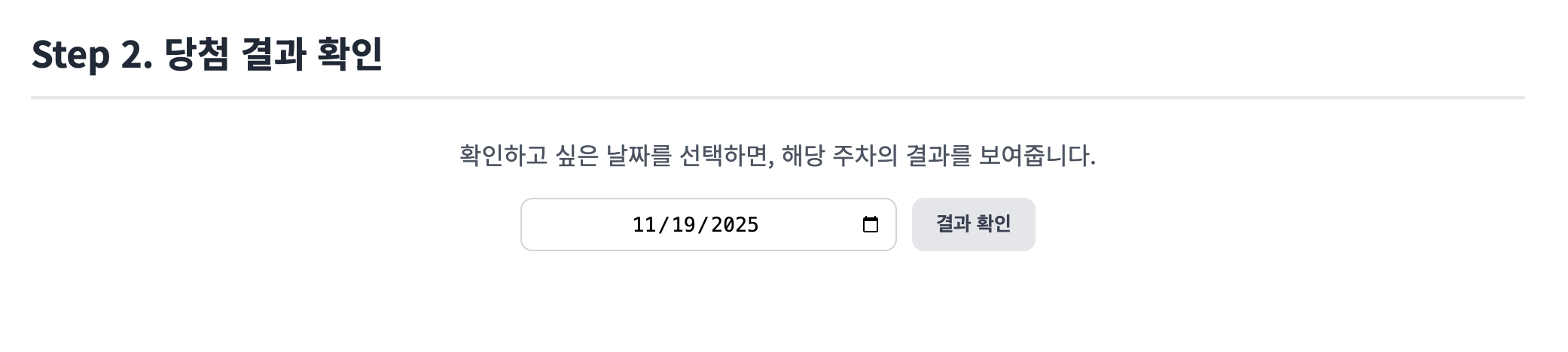
그래서 몇 개의 수정을 설계했다.
1. 당첨 번호를 나만의 로또, 구매 로또 처럼 당첨 로또를 목록 형식으로 확인할 수 있도록 하기
2. 결과(통계) 내용은 각 주차별 당첨 번호를 클릭 시 결과 페이지로 넘어가서 확인할 수 있도록 하기
3. 구매한 로또 중 어느 로또가 해당 결과에 들어갔고 그 로또가 몇등인지를 좀 더 자세히 보여주도록 하기
위와 같이 요구사항을 정의하고 나니 당첨 결과 DTO, Service, Controller는 수정이 필요했고 당첨 번호와 결과에 대해서 추가적인 DTO가 필요했다.
1. StatisticsResponseDTO (수정)
package com.woowa.lotto.dto.response;

import com.woowa.lotto.domain.LottoRank;
import lombok.Builder;
import lombok.Getter;

import java.time.LocalDate;
import java.util.List;
import java.util.Map;

@Getter
@Builder
public class StatisticsResponseDTO {
    private final LocalDate drawDate;  // 추첨일
    private final List<Integer> winningNumbers;  // 해당 주차의 당첨 번호
    private final Integer bonusNum;  // 보너스 번호
    private final Map<LottoRank, Integer> rankCounts;  // 등수별 당첨 횟수
    private final double rateOfReturn;  // 수익률

    // 1. 총 구매 금액
    private final long totalPurchaseAmount;

    // 2. 총 당첨 금액
    private final long totalWinningMoney;

    // 3. 개별 로또 상세 결과 리스트
    private final List<LottoResultResponseDTO> lottoResults;
}
2. WinningLottoResponseDTO (추가)
package com.woowa.lotto.dto.response;

import com.woowa.lotto.domain.WinningLotto;
import lombok.Builder;
import lombok.Getter;
import java.time.LocalDate;
import java.util.List;

@Getter
@Builder
public class WinningLottoResponseDTO {
    private Long id;
    private LocalDate drawDate;
    private List<Integer> numbers;
    private Integer bonusNum;

    public static WinningLottoResponseDTO from(WinningLotto entity) {
        return WinningLottoResponseDTO.builder()
                .id(entity.getId())
                .drawDate(entity.getDrawDate())
                .numbers(entity.getWinningLotto().getNumbers())
                .bonusNum(entity.getBonusNum())
                .build();
    }
}
3. LottoResultResponseDTO (추가)
package com.woowa.lotto.dto.response;

import com.woowa.lotto.domain.LottoRank;
import lombok.Builder;
import lombok.Getter;
import java.time.LocalDate;
import java.util.List;

@Getter
@Builder
public class LottoResultResponseDTO {
    private Long id;                // 로또 ID
    private LocalDate purchaseDate; // 구매 날짜
    private List<Integer> numbers;  // 로또 번호
    private LottoRank rank;         // 당첨 등수
}
4. LottoService (수정)
public void createWinningLotto(WinningLottoCreateRequestDTO request) {
    Lotto lotto = new Lotto(request.getNumbers());
    WinningLotto winningLotto = new WinningLotto(
            lotto,
            request.getBonusNum(),
            request.getDrawDate()
    );
    winningLottoRepository.save(winningLotto);
}

@Transactional(readOnly = true)
public List<WinningLottoResponseDTO> findAllWinningLottos() {
    return winningLottoRepository.findAll().stream()
            // 추첨일 내림차순 정렬 (최신 날짜가 위로)
            .sorted((a, b) -> b.getDrawDate().compareTo(a.getDrawDate()))
            .map(WinningLottoResponseDTO::from)
            .collect(Collectors.toList());
}

@Transactional(readOnly = true)
public StatisticsResponseDTO getStatistics(LocalDate queryDate) {
    // 주간 범위 계산
    LocalDate startOfWeek = queryDate.with(TemporalAdjusters.previousOrSame(DayOfWeek.MONDAY));
    LocalDate endOfWeek = queryDate.with(TemporalAdjusters.nextOrSame(DayOfWeek.SUNDAY));

    // 당첨 번호 조회
    WinningLotto winningLotto = winningLottoRepository.findByDrawDateBetween(startOfWeek, endOfWeek)
            .orElseThrow(() -> new IllegalArgumentException(
                    String.format("[ERROR] 해당 주차(%s ~ %s)의 당첨 번호가 존재하지 않습니다.", startOfWeek, endOfWeek)));

    // 구매 목록 조회
    List<PurchasedLotto> purchasedLottos = purchasedLottoRepository.findAllByPurchaseDateBetween(startOfWeek, endOfWeek);

    // 통계 계산 및 상세 결과 리스트 생성
    List<LottoResultResponseDTO> lottoResults = new ArrayList<>();
    Map<LottoRank, Integer> rankCounts = new EnumMap<>(LottoRank.class);

    for (LottoRank rank : LottoRank.values()) {
        rankCounts.put(rank, 0);
    }

    long totalWinningMoney = 0; // 총 당첨 금액

    for (PurchasedLotto ticket : purchasedLottos) {
        // 등수 판별
        LottoRank rank = checkRank(ticket, winningLotto);

        // 통계 누적
        rankCounts.put(rank, rankCounts.get(rank) + 1);
        totalWinningMoney += rank.getWinningPrize();

        // 상세 결과 DTO 생성 및 추가
        lottoResults.add(LottoResultResponseDTO.builder()
                .id(ticket.getId())
                .purchaseDate(ticket.getPurchaseDate())
                .numbers(ticket.getPurchasedLotto().getNumbers())
                .rank(rank)
                .build());
    }

    // 수익률 계산
    long totalPurchaseAmount = purchasedLottos.size() * 1000L;
    double rateOfReturn = 0.0;
    if (totalPurchaseAmount > 0) {
        rateOfReturn = ((double) totalWinningMoney / totalPurchaseAmount) * 100.0;
    }

    // DTO 반환
    return StatisticsResponseDTO.builder()
            .drawDate(winningLotto.getDrawDate())
            .winningNumbers(winningLotto.getWinningLotto().getNumbers())
            .bonusNum(winningLotto.getBonusNum())
            .rankCounts(rankCounts)
            .rateOfReturn(rateOfReturn)
            .totalPurchaseAmount(totalPurchaseAmount)
            .totalWinningMoney(totalWinningMoney)
            .lottoResults(lottoResults)
            .build();
}

// 등수 판별
private LottoRank checkRank(PurchasedLotto ticket, WinningLotto winningLotto) {
    Lotto userLotto = ticket.getPurchasedLotto();
    Lotto winningNumbers = winningLotto.getWinningLotto();

    int matchCount = userLotto.matchCount(winningNumbers);
    boolean hasBonus = userLotto.hasBonusNum(winningLotto.getBonusNum());

    return LottoRank.find(matchCount, hasBonus);
}
5. LottoController (수정)
// 당첨 번호 목록 조회
@GetMapping("/winning-lotto")
public ResponseEntity<List<WinningLottoResponseDTO>> getWinningLottoList() {
    return ResponseEntity.ok(lottoService.findAllWinningLottos());
}
이렇게 백엔드를 수정한 다음 winning-lotto.html 페이지에서 다 보여줬던 정보를 페이지를 나눴다. 당첨 번호 목록을 보여주는 페이지, 당첨 번호를 등록하는 페이지, 당첨 결과를 확인하는 페이지 이렇게 3개로 나눠서 구현하였다.
1. winning-lotto.html (당첨 목록 페이지)
class="main-content">
<h1 class="content-title">당첨 회차 목록</h1>
<p class="content-subtitle">등록된 당첨 번호 목록입니다. '결과 확인'을 눌러 상세 통계를 확인하세요.</p>
<div style="text-align: right; margin-bottom: 1rem;">
<a href="winning-lotto-add.html" class="btn btn-primary">새 당첨 번호 등록</a>
</div>
<table class="lotto-table">
<thead>
<tr>
<th>추첨일 (기준일)</th>
<th>당첨 번호</th>
<th>보너스</th>
<th>상세보기</th>
</tr>
</thead>
<tbody id="winning-list-body">
<tr><td colspan="4">데이터를 불러오는 중...</td></tr>
</tbody>
</table>
</main>
<footer class="site-footer">
<p>Copyright © 2025 Im-minji</p>
</footer>
<script>
document.addEventListener('DOMContentLoaded', async () => {
const tableBody = document.getElementById('winning-list-body');
try {
// [API 호출] 목록 조회
const response = await fetch('/im-minji/winning-lotto');
if (!response.ok) throw new Error('목록을 불러오는데 실패했습니다.');
const list = await response.json();
tableBody.innerHTML = ''; // 로딩 문구 제거
if (list.length === 0) {
tableBody.innerHTML = '<tr><td colspan="4">등록된 당첨 번호가 없습니다.</td></tr>';
return;
}
// 리스트 렌더링
list.forEach(item => {
const tr = document.createElement('tr');
// item: { id, drawDate, numbers: [], bonusNum }
tr.innerHTML = `
<td>${item.drawDate}</td>
<td style="letter-spacing: 2px; font-weight: bold; color: #003458;">
${item.numbers.join(', ')}
</td>
<td style="color: #d9534f; font-weight: bold;">${item.bonusNum}</td>
<td>
<a href="winning-lotto-result.html?date=${item.drawDate}" class="btn btn-small btn-secondary">결과 확인</a>
</td>
`;
tableBody.appendChild(tr);
});
} catch (error) {
tableBody.innerHTML = `<tr><td colspan="4" class="error-text">${error.message}</td></tr>`;
}
});
</script>
2. winning-lotto-add.html (당첨 번호 추가 페이지)
<main class="main-content">
<h1 class="content-title">당첨 번호 등록</h1>
<p class="content-subtitle">이번 주 당첨 번호를 등록해주세요.</p>
<div class="save-form-box" style="text-align: center; max-width: 600px; margin-top: 2rem;">
<div class="input-group">
<label class="input-label" style="text-align: center;">당첨 번호 6개</label>
<div class="lotto-inputs">
<input type="number" class="lotto-input win-num" min="1" max="45">
<input type="number" class="lotto-input win-num" min="1" max="45">
<input type="number" class="lotto-input win-num" min="1" max="45">
<input type="number" class="lotto-input win-num" min="1" max="45">
<input type="number" class="lotto-input win-num" min="1" max="45">
<input type="number" class="lotto-input win-num" min="1" max="45">
</div>
</div>
<div class="input-group">
<label class="input-label" style="text-align: center; color: #b91c1c;">보너스 번호</label>
<div class="lotto-inputs">
<input type="number" id="bonus-num" class="lotto-input bonus" min="1" max="45">
</div>
</div>
<div class="input-group">
<label class="input-label" style="text-align: center;">추첨일 (기준 날짜)</label>
<input type="date" id="draw-date" class="input-field date-input">
</div>
<div class="button-group" style="margin-top: 2rem;">
<button id="btn-register" class="btn btn-primary">등록하기</button>
<a href="winning-lotto.html" class="btn btn-secondary">취소</a>
</div>
</div>
</main>
<footer class="site-footer">
<p>Copyright © 2025 Im-minji</p>
</footer>
<script>
document.addEventListener('DOMContentLoaded', () => {
// 오늘 날짜 기본 세팅
document.getElementById('draw-date').value = new Date().toISOString().split('T')[0];
document.getElementById('btn-register').addEventListener('click', async () => {
const winNumInputs = document.querySelectorAll('.win-num');
const bonusInput = document.getElementById('bonus-num');
const dateInput = document.getElementById('draw-date');
// 값 수집
const numbers = Array.from(winNumInputs).map(i => parseInt(i.value));
const bonusNum = parseInt(bonusInput.value);
const drawDate = dateInput.value;
// 유효성 검사
if (numbers.some(isNaN) || isNaN(bonusNum) || !drawDate) {
alert('모든 번호와 날짜를 입력해주세요.');
return;
}
// 중복 검사 (Client Side)
if (new Set(numbers).size !== 6) {
alert('당첨 번호 6개는 중복될 수 없습니다.');
return;
}
try {
// [API 호출] 당첨 번호 등록
const response = await fetch('/im-minji/winning-lotto', {
method: 'POST',
headers: { 'Content-Type': 'application/json' },
body: JSON.stringify({ numbers, bonusNum, drawDate })
});
if (!response.ok) throw new Error('등록에 실패했습니다.');
alert('성공적으로 등록되었습니다!');
// 목록 페이지로 이동
window.location.href = 'winning-lotto.html';
} catch (error) {
alert(error.message);
}
});
});
</script>
3. winning-lotto-result.html (당첨 결과 확인 페이지)
<div style="max-width: 800px; margin: 40px auto 0 auto;">
<h3 style="text-align: left; margin-bottom: 10px;">🧾 이번 주 구매 로또 상세 결과</h3>
<table class="lotto-table">
<thead>
<tr>
<th>구매일</th>
<th>로또 번호</th>
<th>결과</th>
</tr>
</thead>
<tbody id="detail-list-body">
</tbody>
</table>
</div>
<div style="margin-top: 3rem;">
<a href="winning-lotto.html" class="btn btn-secondary">목록으로 돌아가기</a>
</div>
</div>
</main>
<footer class="site-footer">
<p>Copyright © 2025 Im-minji</p>
</footer>
<script>
document.addEventListener('DOMContentLoaded', async () => {
// URL 파라미터에서 날짜 추출
const params = new URLSearchParams(window.location.search);
const date = params.get('date'); // ?date=2025-11-19
if (!date) {
alert('잘못된 접근입니다.');
window.location.href = 'winning-lotto.html';
return;
}
document.getElementById('date-info').innerText = `기준일: ${date} 주차의 결과입니다.`;
try {
// 통계 조회
const response = await fetch(`/im-minji/statistics?date=${date}`);
if (!response.ok) {
// 해당 날짜에 당첨 번호가 없거나 구매 내역 조회 실패 시
throw new Error('결과를 불러올 수 없습니다.');
}
const data = await response.json();
renderResults(data);
} catch (error) {
alert(error.message);
document.getElementById('date-info').innerText = "데이터 조회 실패";
}
});
function renderResults(data) {
const formatter = new Intl.NumberFormat('ko-KR', { style: 'currency', currency: 'KRW' });
// 영역 표시
document.getElementById('result-area').classList.remove('hidden');
// 1. 요약 정보 바인딩
document.getElementById('total-purchase').innerText = formatter.format(data.totalPurchaseAmount);
document.getElementById('total-win').innerText = formatter.format(data.totalWinningMoney);
document.getElementById('roi').innerText = data.rateOfReturn.toFixed(1) + '%';
// 2. 등수별 카운트 바인딩
const ranks = ['FIRST', 'SECOND', 'THIRD', 'FOURTH', 'FIFTH', 'NONE'];
ranks.forEach(rank => {
const el = document.getElementById(`count-${rank}`);
if (el) el.innerText = (data.rankCounts[rank] || 0) + '개';
});
// 3. 상세 로또 리스트 바인딩 (lottoResults 사용)
const tbody = document.getElementById('detail-list-body');
tbody.innerHTML = '';
if (!data.lottoResults || data.lottoResults.length === 0) {
tbody.innerHTML = '<tr><td colspan="3">해당 주차에 구매한 로또가 없습니다.</td></tr>';
return;
}
data.lottoResults.forEach(ticket => {
const tr = document.createElement('tr');
let badge = `<span style="color: #aaa;">꽝</span>`;
if (ticket.rank === 'FIRST') badge = `<span style="color: red; font-weight: bold;">1등</span>`;
else if (ticket.rank === 'SECOND') badge = `<span style="color: orange; font-weight: bold;">2등</span>`;
else if (ticket.rank === 'THIRD') badge = `<span style="color: gold; font-weight: bold;">3등</span>`;
else if (ticket.rank === 'FOURTH') badge = `<span style="color: blue; font-weight: bold;">4등</span>`;
else if (ticket.rank === 'FIFTH') badge = `<span style="color: green; font-weight: bold;">5등</span>`;
tr.innerHTML = `
<td>${ticket.purchaseDate}</td>
<td style="letter-spacing: 1px;">${ticket.numbers.join(', ')}</td>
<td>${badge}</td>
`;
tbody.appendChild(tr);
});
}
</script>이제 완성된 페이지를 확인해보면

winning-lotto 페이지가 목록 형식으로 바뀌었고 여기서 새 당첨 번호 등록 버튼을 누르면 원래 winning-lotto 페이지의 step1 내용이 나타난다.

당첨 번호를 추가하면 목록에 추가된다.

당첨 번호를 추가하고 나서 이제 테스트를 위해 구매 로또를 추가해두고
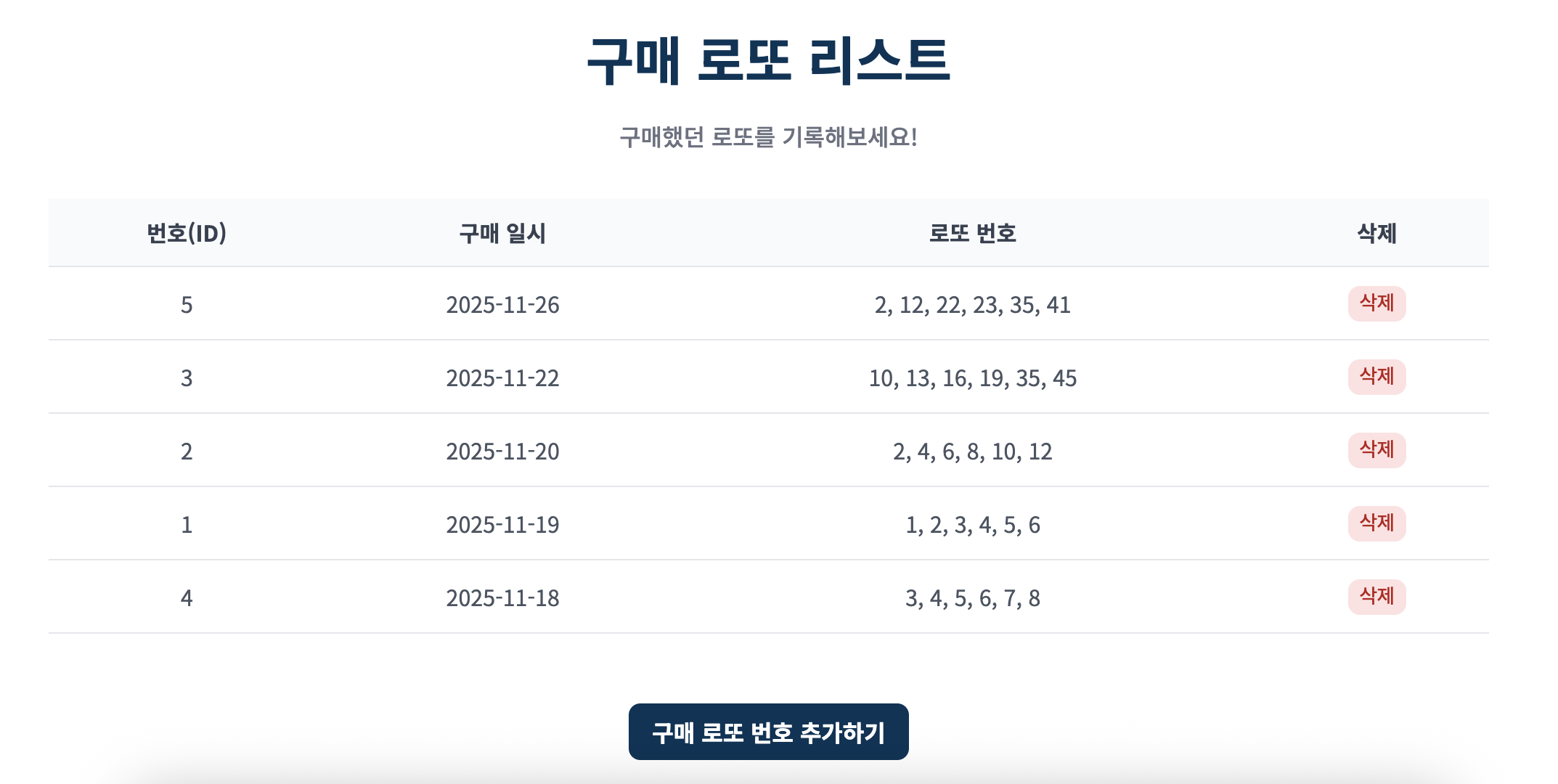
결과 확인 버튼을 누르면 결과 페이지로 이동한다.

이 페이지에서는 예전과 달리 총 구매 금액과 당첨 금액과 함께 수익률을 제공한다. 또한 이번 주 구매 로또 상세 결과를 통해 어떤 로또가 몇 등을 했는 지를 확인할 수 있다.
이렇게 해서 스프링부트 로또 웹 프로젝트는 끝이 났다..!! 5주가 짧은 시간은 아니였지만 프리코스를 진행하는 동안에는 과제 하나를 열심히 끝내고 나면 한 주가 후딱 후딱 지나가 있어서 지금까지와는 다르게 정말 빠르게 지나간 것 같다. 분명 나중에 이 프로젝트를 보면 아쉬운 부분이 있을 수도 있지만 지금의 나한테는 정말 엄청난 도전이었고 솔직히 2주 안에 끝내지 못할까봐 걱정을 많이 했는데 이렇게 마무리했다는 것만으로도 뿌듯하다고 자신있게 말할 수 있다. 또한 나는 기록하는 것을 안한 지 꽤 되었는데 이번 오픈 미션 1일차에 말한대로 오픈 미션을 진행하는 동안 매일 기록하기라는 내 자신과의 약속도 끝까지 지켜냈다!! 나와의 도전이 연속이였던 2주였고 타협하기 보다는 계속해서 계획을 세우고 실천하려고 노력하며 성장하려고 노력했다. 앞으로도 이러한 정신을 잊지않고 나에게 계속 적용시킬 것이다. 난 결국 해냈다!! 할 수 있다. 이제 제출할 준비를 하고 마무리되면 제출을 하고 결과를 기다릴 것이다. 떨리지만 후회없이 열심히 했으니 미련은 없다 아자자 끝까지 집중해서 잘 마무리하자 화이팅!! 💪🏼


